
CLASSICGROUP
- Opens the Group Manager dialog box, where you can create, modify, and manage groups in the drawing.

1. Opening Group Manager Demo Video
Section titled “1. Opening Group Manager Demo Video”1) Type “CLASSICGROUP” in the Command Input Window.
2) The Group Manager dialog box appears.
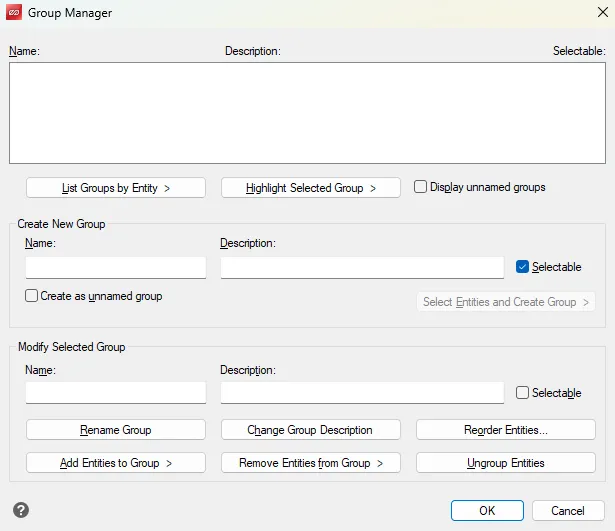
3) Select the desired function to manage groups.
2. Main Functions
Section titled “2. Main Functions”1) Create New Group
- Name: Specifies the group name
- Description: Enters a description for the group
- Selectable: Sets whether the group can be selected as if it were an object
- Create as unnamed group: Creates the group without a name
- Select Entities and Create Group : Selects objects in the drawing and creates a group
2) Modify Selected Group
- Rename Group : Changes the group name
- Change Group Description : Changes the group description
- Reorder Entities: Changes the order of objects within the group
- Add Entities to Group : Adds new objects to the group
- Remove Entities from Group : Removes specific objects from the group
- Ungroup Entities: Disbands the group (same function as UNGROUP)