
OTPLINE
- Converts objects to polylines and edits them.
- Objects that can be converted to polylines are circles, arcs, ellipses, 3D faces, lines, solids, and splines.
- Objects that can be converted to 3D polylines are lines and faces.
- Running the command and entering the Settings (S) keyword opens the command options popup window, where you can configure the command’s behavior options.
- Clicking the “Reset” button resets the command options to the default settings.

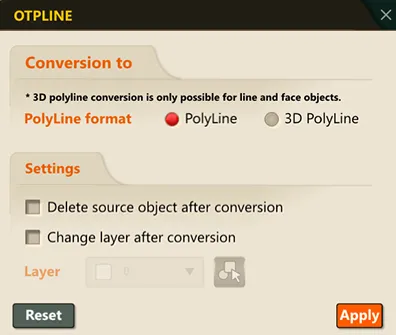
Demo Video: Modifying and Resetting Polyline Conversion Settings
1. Converting to a Polyline and Deleting the Original Demo Video
Section titled “1. Converting to a Polyline and Deleting the Original Demo Video”1) Run the “OTPLINE” command and enter the S keyword.
2) Check the polyline format, check “Delete source object after conversion” in the settings, and click the “OK” button.
3) Select the objects to convert to polylines and press ENTER.
2. Converting to a Polyline and Changing the Layer
Section titled “2. Converting to a Polyline and Changing the Layer”1) Run the “OTPLINE” command and enter the S keyword.
2) Check the polyline format, check “Change layer after conversion” in the settings, and click the “OK” button.
3) Select the objects to convert to polylines and press ENTER.