
CPLINE
- A command that converts a polyline to a 3D polyline, or a 3D polyline to a polyline.
- After conversion, you can also delete the original polyline or change the layer of the converted polyline.
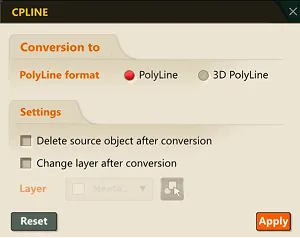
- PolyLine format: Specifies the type that the selected polyline/3D polyline will be converted to.
- Delete source object after conversion: If checked, the original object being converted is deleted. If unchecked, the original object is not deleted.
- Change layer after conversion: If checked, the layer of the converted object is changed to the layer specified with the Layer button. If unchecked, the converted object’s layer is the same as the original object’s.
1. Converting Between Polyline Types Demo Video
Section titled “1. Converting Between Polyline Types Demo Video”1) Run the “CPLINE” command.
2) Select the polyline/3D polyline object to convert, and press ENTER.
3) The selected polyline/3D polyline is converted to the type set in the popup.