
CUTCSE
- Draws a section cutting line.
How to Configure Options
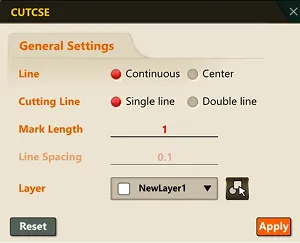
Section titled “How to Configure Options”- Run the command and enter the Settings (S) option keyword to open the command options popup. In this popup, you can configure the command’s behavior options.

-
Click the “Reset” button to restore the command options to their defaults.
-
You can configure the option values in the popup before drawing the section cutting line.
-
You can specify the layer for the section cutting line using the combo box, or click the
 button to select an object on screen and set its layer as the layer for the section cutting line.
 -
The changed settings take effect when you click “OK.”
1. Drawing a Section Cutting Line Demo Video
Section titled “1. Drawing a Section Cutting Line Demo Video”1) Run the “CUTCSE” command.
2) Click the mouse to specify the start point.
3) Click the mouse to specify the end point.
4) Press the ESC key to end the command.