
EBBOUNDARY
- A command that trims the interior or exterior boundary area based on the selected object.

1. Trimming Outside / Inside an Object Demo Video
Section titled “1. Trimming Outside / Inside an Object Demo Video”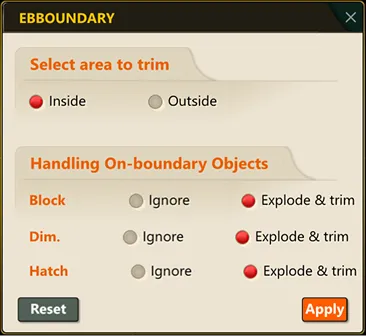
1) Run the “EBBOUNDARY” command.
2) Select either inside the boundary or outside the boundary.
- Inside boundary: trims lines within the interior area based on the selected object.
- Outside boundary: trims lines within the exterior area based on the selected object.
3) Select how to handle objects that cannot be trimmed at the boundary (blocks, dimensions, hatches).
- Ignore: the object is excluded from trimming.
- Explode & trim: the object is exploded before trimming is performed.
4) Click the OK button.
5) Select the objects to trim.
6) Press the ESC key to end the command.