
DRAWARROW
- Draws arrowheads at both ends of a line segment object.
- Running the command opens the command option popup window.
- Clicking the “OK” button in the command option popup window saves the options and starts the arrowhead insertion operation.
- Clicking the “Reset” button resets the command options to their default values.
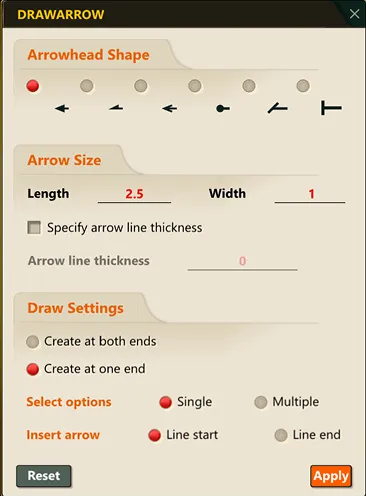
1. Drawing Arrowheads at the Ends of a Line Segment Object Demo Video
Section titled “1. Drawing Arrowheads at the Ends of a Line Segment Object Demo Video”1) Run the “DRAWARROW” command.
2) Set the arrowhead options in the command option popup window and click the “OK” button.
3) Select the line segment object to draw the arrow on with the mouse; arrowheads are drawn at the ends of the object according to the configured settings.