
TEXTORDER
- Sorts content (text/numeric values) in ascending or descending order and automatically rearranges it according to the specified direction.

1. Sorting Text Demo Video
Section titled “1. Sorting Text Demo Video”1) Run the “TEXTORDER” command.
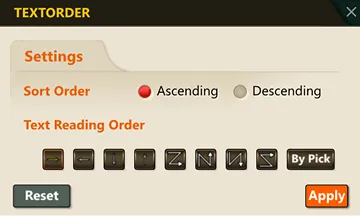
2) Enter “S” and set the desired options in the TEXTORDER dialog box.
3) Select the multiple text objects to sort.
4) Press ENTER or the SPACE BAR.
5) The selected text is automatically sorted according to the specified sort criteria and arrangement order.
