Link other files to the current working file to create and manage external references
How to use
- Method 1
- Command Input Window > Command : BLOCK
- Method 2
-
Command
View All > Block >
 Create Block > Block Manager
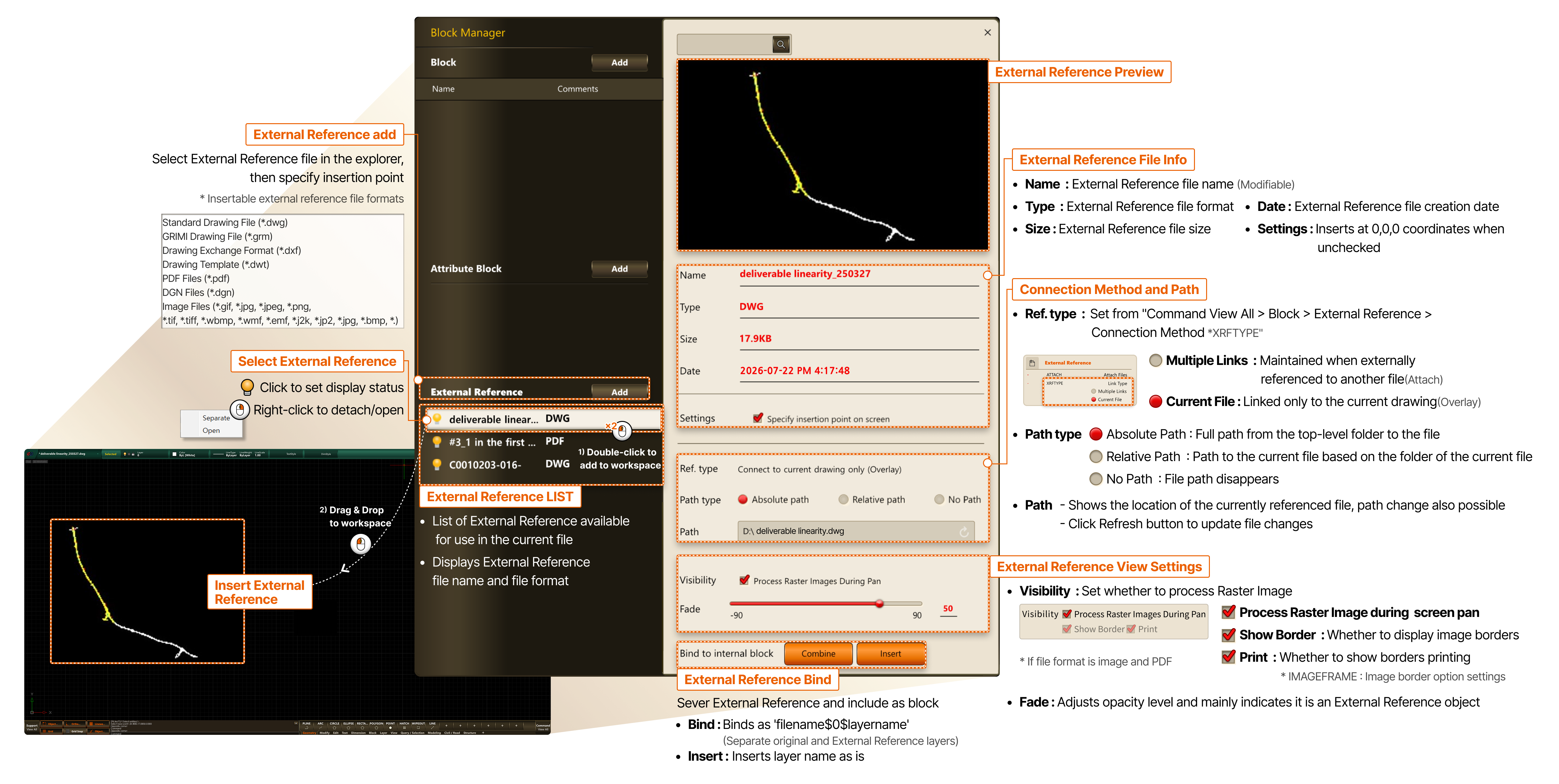
- Add External Reference
- Select External Reference file in the explorer, then specify insertion point * Insertable external reference file formats Standard Drawing File (*.dwg) GRIMI Drawing File (*.grm) Drawing Exchange Format (*.dxf) Drawing Template (*.dwt) PDF Files (*.pdf) DGN Files (*.dgn) Image Files (*.gif, *.jpg, *.jpeg, *.png, *.tif, *.tiff, *.wbmp, *.wmf, *.emf, *.j2k, *.jp2, *.jpg, *.bmp, *.)
- Select External Reference
- Click to set display status
- Right-click to detach/open
- Insert External Reference
- 1) Double-click to add to workspace
- 2) Drag & Drop to workspace
- External Reference LIST
- List of External Reference available for use in the current file
- Displays External Reference file name and file format
- External Reference Preview
- External Reference File Info
- Name : External Reference file name (Modifiable)
- Type : External Reference file format
- Size : External Reference file size
- Date : External Reference file creation date
- Settings : Inserts at 0,0,0 coordinates when unchecked
- Connection Method and Path
- Connection Method : Set from "Command View All > Block > External Reference > Connection Method *XRFTYPE"
- Multiple Links : Maintained when externally referenced to another file (Attach)
- Current File : Linked only to the current drawing (Overlay)
- Path Type - Absolute Path : Full path from the top-level folder to the file - Relative Path : Path to the current file based on the folder of the current file - No Path : File path disappears
- Path - Shows the location of the currently referenced file, path change also possible - Click Refresh button to update file changes
- External Reference View Settings
- Visibility : Set whether to process Raster Image
- Process Raster Image during screen pan
- Show Border : Whether to display image borders * If file format is image and PDF
- Print : Whether to display borders when printing * IMAGEFRAME : Image border option settings
- Fade : Adjusts opacity level and mainly indicates it is an External Reference object