DISTANCETEXT
- Automatically calculates the distance (Length) between two points and displays it as text.

1. Displaying a Distance Demo Video
Section titled “1. Displaying a Distance Demo Video”1) Type “DISTANCETEXT” in the Command Input Window.
2) Type S in the Command Input Window to open the settings dialog box.
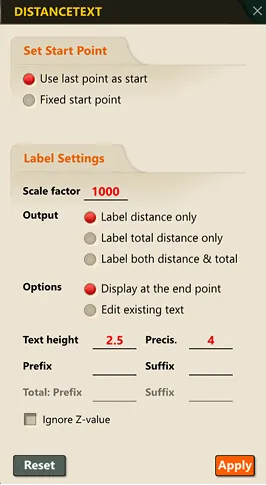
3) Select the desired options in the dialog box.
4) Following the Command Input Window prompts, specify the two points in order.
- First point: the starting point for the distance measurement
- Second point: the ending point for the distance measurement
5) The straight-line distance between the two points is displayed in the Command Input Window, and the distance value is simultaneously inserted as text at that location.