Create, modify, and manage line styles as user styles
How to use
- Method 1
- Command Input Window > Command : LINETYPE
- Method 2
-
Command View
All > Geometry >
 Line Style > Create and Modifies
Linetypes
Line Style > Create and Modifies
Linetypes
- Method 3
- Top Bar > Line Style > Advanced settings
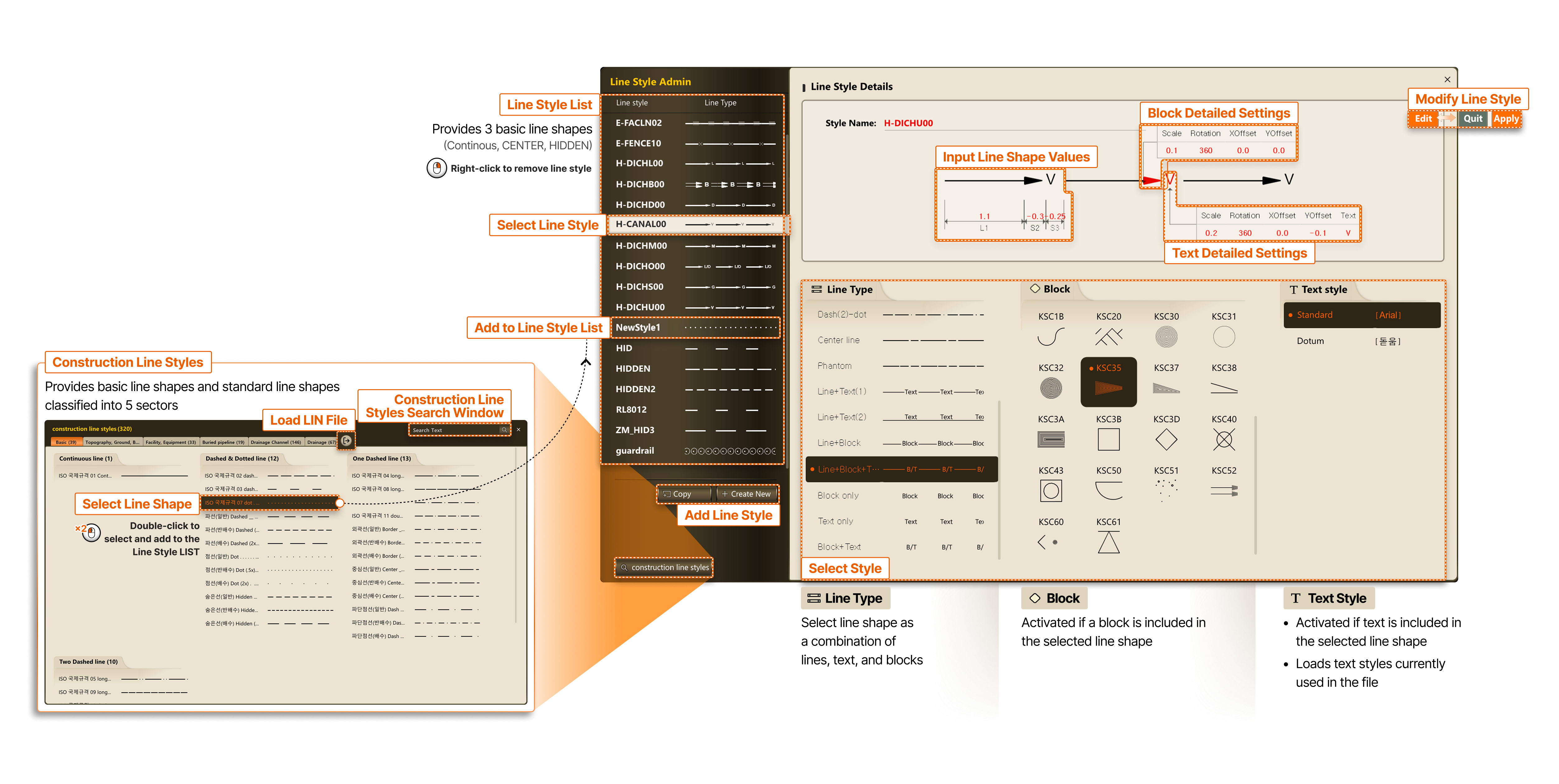
- Construction Line Styles
- Provides basic line shapes and standard line shapes classified into 5 sectors
- Load LIN File
- Construction Line Styles Search Window
- Select Line Shape
- Double-click to select and add to the Line Style LIST
- Basic Information
- Basic properties that all objects have
- Add to Line Style LIST
- Line Style LIST
- Provides 3 basic line shapes (Continuous, CENTER, HIDDEN)
- Right-click to remove line style
- Select Line Style
- Input Line Shape Values
- Block Detailed Settings
- Text Detailed Settings
- Modify Line Style
- Edit → Quit/Apply
- Select Style
- Line Type : Select line shape as a combination of lines, text, and blocks
- Block : Activated if a block is included in the selected line shape
- Text Style : Activated if text is included in the selected line shape, loads text styles currently used in the file