APTEXT
- This function makes it easy to add a header, intermediate text, or footer to a selected text object.

1. Editing Text Demo Video
Section titled “1. Editing Text Demo Video”1) Run the “APTEXT” command.
2) Select the object to insert into.
3) Enter the required items in the APTEXT dialog box.
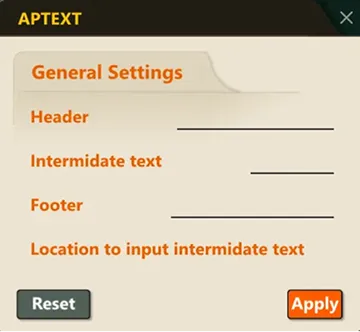
- Header: The string to add to the beginning of the text.
- Intermediate text: The string to insert at the specified position.
- Footer: The string to add to the end of the text.
- Location to input intermediate text: The position in the original string where the intermediate text will be inserted (character index, a number).
4) When you are done configuring, click the OK button.
5) The specified header, intermediate text, and footer are applied to the selected text.
