OVERKILL
- Automatically finds duplicate or unnecessarily overlapping objects in the drawing and cleans them up by deleting or merging them.

1. Deleting Duplicate Objects Demo Video
Section titled “1. Deleting Duplicate Objects Demo Video”1) Run the “OVERKILL” command.
2) Select the objects to check for duplicates.
3) Press ENTER to complete the selection.
4) The “Delete Duplicate Objects (Overkill)” options dialog box appears.
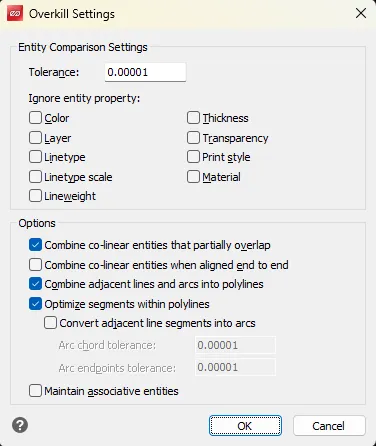
5) Configure the desired options, then click “OK”.
6) The duplicate objects are deleted, leaving only the cleaned-up objects.