OFFSETTOLAYER
- Performs the OFFSET command onto a selected layer.
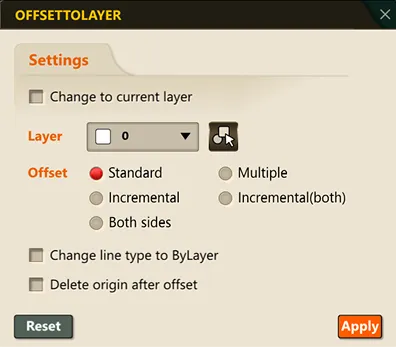
- When “Change to current layer” is checked, the new object created after the offset is completed is moved to the current layer.
- When a layer is selected, the new object created after the offset is completed is moved to the selected layer.
- Standard: Duplicates the selected object in parallel, in one direction, by a specified distance.
- Incremental: When offsetting multiple times, successively creates objects at multiples (increments) of the previous offset distance.
- Both sides: Simultaneously creates offsets in both symmetric directions (left/right) relative to the selected object
- Multiple: Creates multiple offset lines at different intervals in succession with a single command
- Incremental(both): Symmetric offsetting in both directions, with an incremental distance applied in each direction
1. How to Use Demo Video
Section titled “1. How to Use Demo Video”1) Type the “OFFSETTOLAYER” command in the Command Input Window.
2) In the OFFSETTOLAYER dialog box, set the OFFSET conditions.
3) Once configured, click the OK button.
4) An object offset and moved to the layer selected in the dialog box’s layer field is created.
5) The OFFSET command runs according to the configured offset method.