TRIMMODE
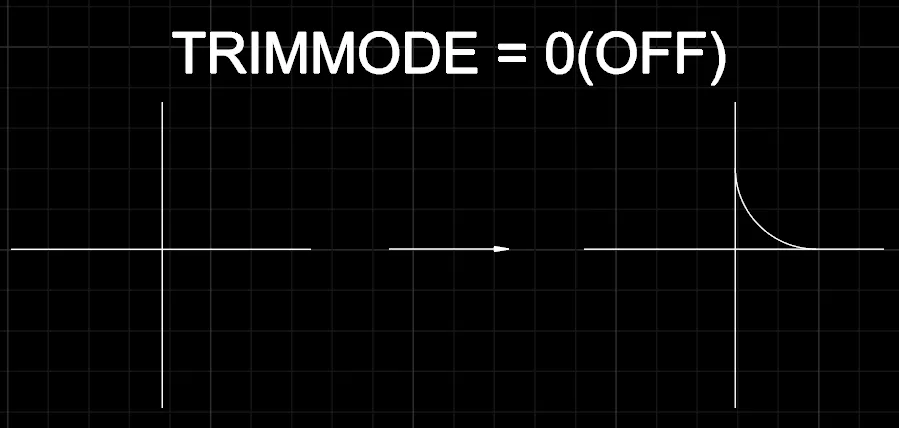
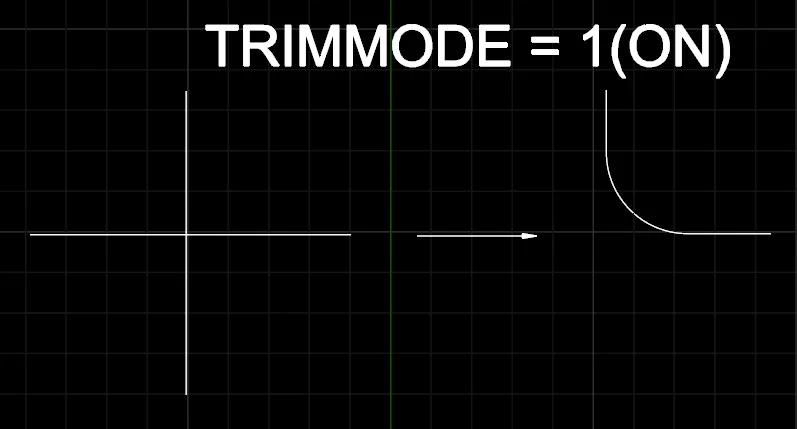
- A system variable command that determines whether the original lines are automatically trimmed during Fillet (FILLET)/Chamfer (CHAMFER) operations.
- This command sets whether the original lines are automatically trimmed.
- TRIMMODE = ON(1): Does not keep
- TRIMMODE = OFF(0): Keeps

1. Not Keeping the Original Edge Before Fillet/Chamfer Demo Video
Section titled “1. Not Keeping the Original Edge Before Fillet/Chamfer Demo Video”1) Run the “TRIMMODE” command and enter “1” or “ON”.
2) To verify, run the “FILLET” command.
3) Enter the Radius (R) keyword, enter a value, then press ENTER. (If the radius is set to 0, no arc will be created.)
4) Select the first intersecting line object.
5) Select the second line object and check the result.
2. Keeping the Original Edge Before Fillet/Chamfer Demo Video
Section titled “2. Keeping the Original Edge Before Fillet/Chamfer Demo Video”1) Run the “TRIMMODE” command and enter “0” or “OFF”.
2) To verify, run the “FILLET” command.
3) Enter the Radius (R) keyword, enter a value, then press ENTER. (If the radius is set to 0, no arc will be created.)
4) Select the first intersecting line object.
5) Select the second line object and check the result.