LAYER
- Creates, manages, and edits the layers used in the drawing. Layers let you systematically manage object properties (color, linetype, lineweight, plot status, etc.), improving the efficiency and readability of drawing work.

1. Manage Layers Demo Video
Section titled “1. Manage Layers Demo Video”1) Type the “LAYER” command in the Command Input Window.
2) The Layer Properties Manager dialog box appears.
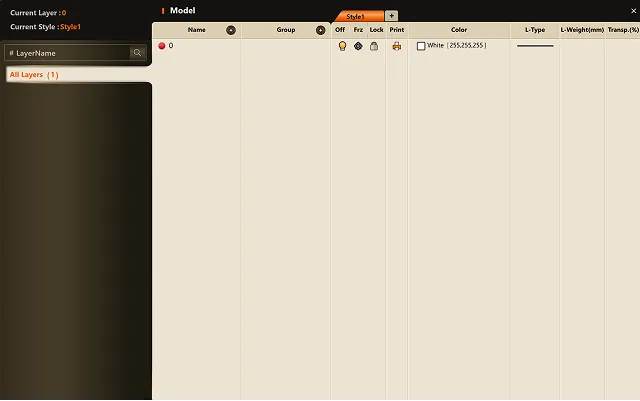
3) You can perform the following tasks.
- Create a new layer
- Delete a layer
- Rename a layer
- Set the layer color, linetype, and lineweight
- Set layer On/Off, Freeze/Thaw, Lock/Unlock
- Set plot status
4) When you finish configuring the settings and close the dialog box, the changes are applied to the drawing.