Configure the work environment and command icon bar as the user desires
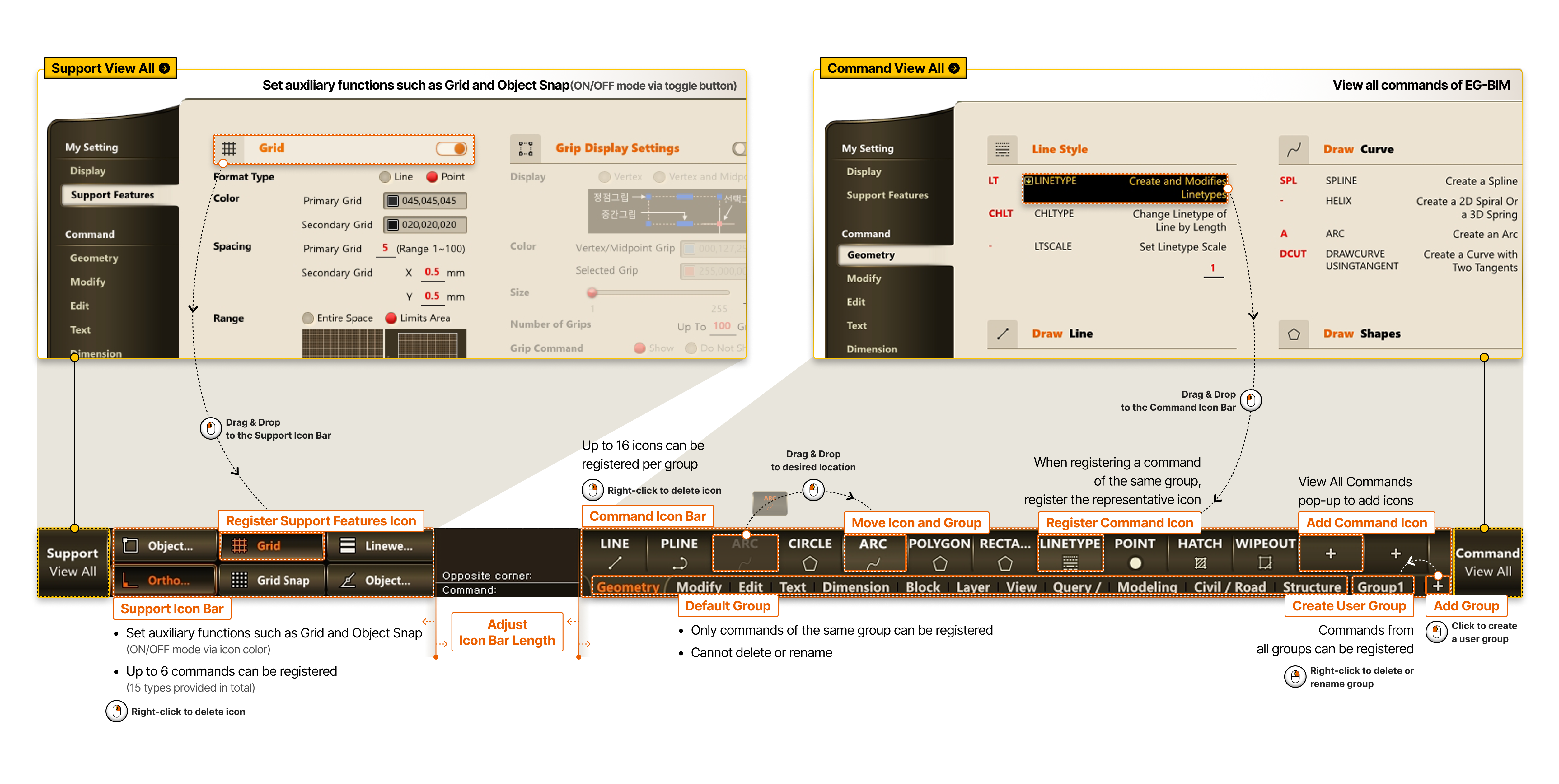
- Support View All Set auxiliary functions such as Grid and Object Snap (ON/OFF mode via toggle button)
- Commands View All View all commands of EG-BIM
-
- Support Icon Bar
- Set auxiliary functions such as Grid and Object Snap (ON/OFF mode via icon color)
- Up to 6 commands can be registered (15 types provided in total)
- Right-click to delete icon
- Register Support Function Icon
- Drag & Drop to the Auxiliary Function Icon Bar
- Adjust Icon Bar Length
- Command Icon Bar
- Up to 16 icons can be registered per group
- Right-click to delete icon
- Default Group
- Only commands of the same group can be registered
- Cannot delete or rename
- Move Icon and Group
- Drag & Drop to desired location
- Register Command Icon
- When registering a command of the same group, register the representative icon
- Drag & Drop to the Command Icon Bar
- Add Command Icon
- View All Commands pop-up to add icons
- Create User Group
- Commands from all groups can be registered
- Right-click to delete or rename group
- Add Group
- Click to create a user group