SELECTSIMILAR
- Quickly selects objects in the drawing based on specific criteria (e.g., layer, color, object type, etc.).

1. Selecting Objects with Identical Properties Demo Video
Section titled “1. Selecting Objects with Identical Properties Demo Video”1) Type “SELECTSIMILAR” in the Command Input Window.
2) Type “SE” to display the dialog box.
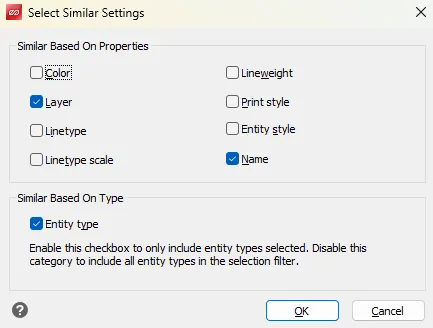
3) In the dialog box, set the desired selection criteria.
4) Click the object in the drawing to use as the reference (a single object).
5) All objects with identical properties are automatically selected.
Note: Selected objects are displayed highlighted in blue.