Basic file-related functions and user settings functions
How to use
- Method 1
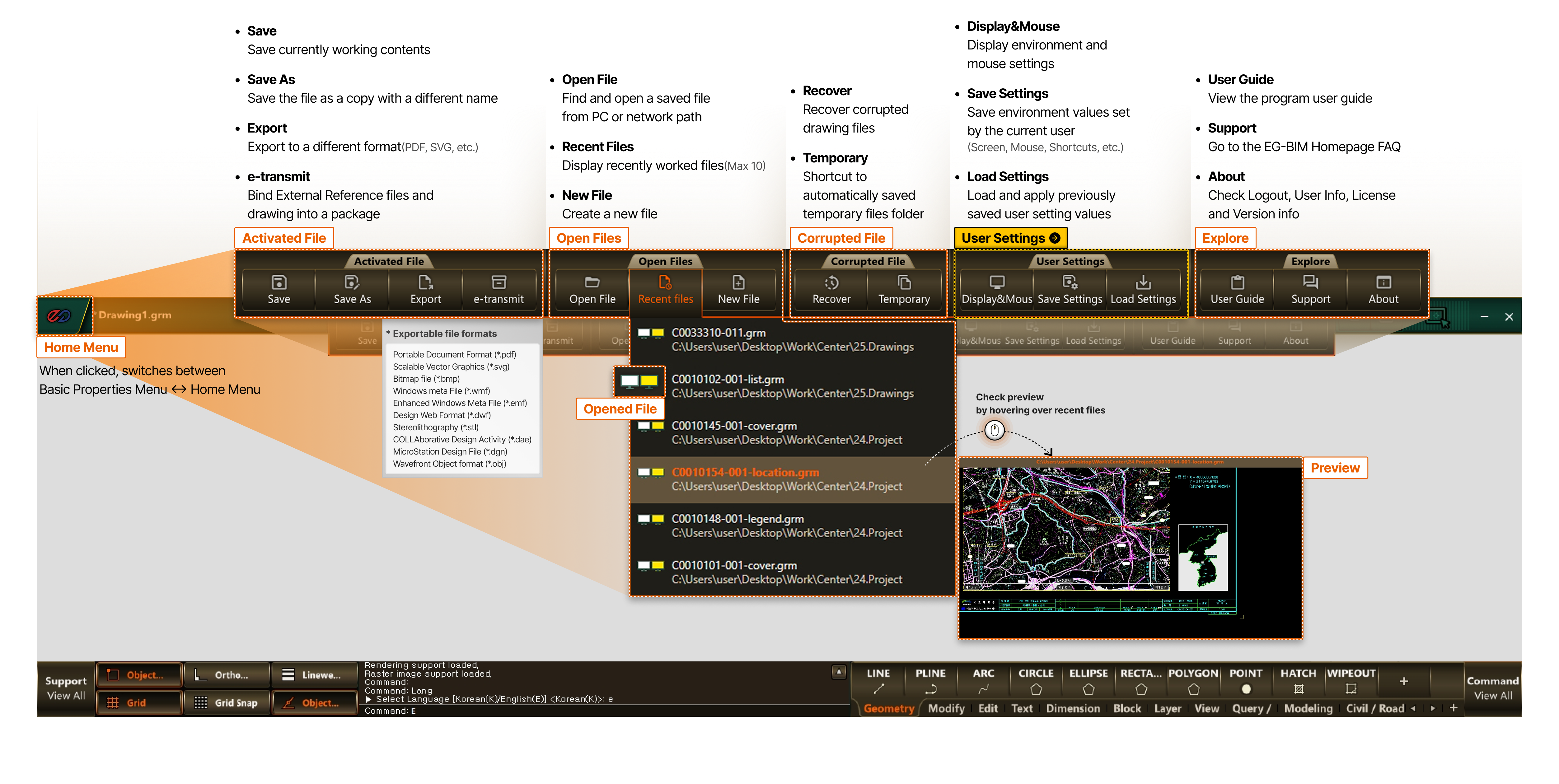
- Top bar left > EG-BIM Logo > Home Menu
-
- Home Menu
- When clicked, switches between Basic Properties Menu ↔ Home Menu
- Activated File
- Save : Save currently working contents
- Save AS : Save the file as a copy with a different name
-
Export : Export to a different format (PDF, SVG, etc.)
* Exportable file formats
Portable Document Format (*.pdf)
Scalable Vector Graphics (*.svg)
Bitmap file (*.bmp)
Windows meta File (*.wmf)
Enhanced Windows Meta File (*.emf)
Design Web Format (*.dwf)
Stereolithography (*.stl)
COLLAborative Design Activity (*.dae)
MicroStation Design File (*.dgn)
Wavefront Object format (*.obj) - e-transmit : Bind External Reference files and drawing into a package
- Open Files
- Open File : Find and open a saved file from PC or network path
- Recent Files : Display recently worked files (Max 10)
- New File : Create a new file
- Opened File
- Preview
- Check preview by hovering over recent files
- Corrupted File
- Recover : Recover corrupted drawing files
- Temporary : Shortcut to automatically saved temporary files folder
- User Settings
- Display & Mouse : Display environment and mouse settings
- Save Settings : Save environment values set by the current user (Screen, Mouse, Shortcuts, etc.)
- Load Settings : Load and apply previously saved user setting values
- Explore
- View Guide : View the program user guide
- Contact Us : Go to the EG-BIM Homepage FAQ
- About : Check license and version information
- Home Menu Collection of file-related menus such as Open, Save, etc.
-
- Explore
- View Guide : View the program user guide
- Contact Us : Go to the EG-BIM Homepage FAQ
- About Check license and version information