TEXTBTPOINT
- Specifies two points on the selected object to automatically place a line and text above and below it.

1. Placing Text Demo Video
Section titled “1. Placing Text Demo Video”1) Run the “TEXTBTPOINT” command.
2) In the TEXTBTPOINT dialog box, set the required options.
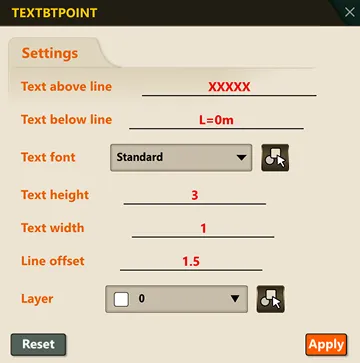
3) Select the object to enter text on.
4) Select the two reference points (the start point and end point of the line segment) in order.
5) The text set in the dialog box for above/below the line is automatically placed.
